

One of these dialogs appears when you click Run CAM Assist and CloudNC can't start the request. CAM Assist retries on its own when the countdown ends.
Usage limit reached
We weren't able to start your request to generate an automated strategy.
We're experiencing high demand
We weren't able to start your request to generate an automated strategy.
The second line may just stop at "request."
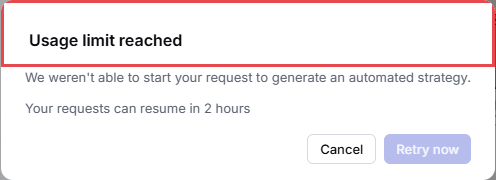
"Usage limit reached"
Your account has sent more requests than its limit allows for now. The dialog shows when you can continue, for example "Your requests can resume in 5 minutes".
- Leave the dialog open. Retry now stays unavailable until the countdown ends, then CAM Assist retries automatically.
- To stop instead, click Cancel. Nothing is generated, and you can run CAM Assist again later.
This isn't your monthly credit allowance. Going over your plan's allowance never stops you mid-job. CAM Assist only stops at your credit limit if your account has opted into usage blocking. See How credits are charged in CAM Assist.
"We're experiencing high demand"
CloudNC couldn't take the request. This also happens when CAM Assist can't reach CloudNC, for example if your internet connection drops.
- Wait. CAM Assist retries after 30 seconds ("Retrying automatically in 30 seconds"), or click Retry now.
- If the dialog keeps coming back, check your internet connection.
- To stop, click Cancel.
Close the dialog only with Cancel or Retry now. Closing it any other way, such as pressing Esc, shows "An error occurred" instead. See "An error occurred" in CAM Assist.
Still seeing it?
If you still see either dialog after waiting, contact CloudNC support. Include the part file and your CAM Assist log files: see Find your CAM Assist log files.