

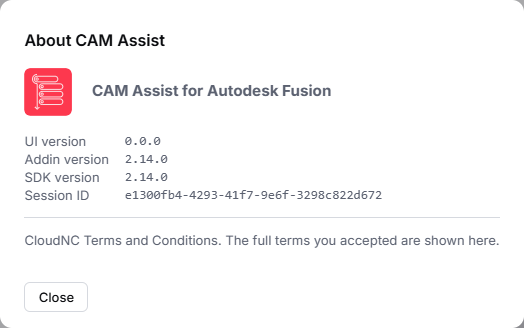
About CAM Assist shows which versions of CAM Assist you're running, your session ID and the terms of use. CloudNC support often asks for these.
Open it
- Click Help (question mark icon) in the header at the top of the window.
- Click About CAM Assist.
What it shows
| Field | What it is |
|---|---|
| Name at the top | The CAM Assist add-in you're using. GovCloud builds add for GovCloud (US). |
| UI version | Version of the CAM Assist window. |
| Addin version | Version of the CAM Assist add-in in your CAM package. Not specified if the add-in didn't report it. |
| SDK version | Version of the CloudNC software that connects your CAM package to the CAM Assist window. Support may ask for it. Not specified if it wasn't reported. |
| Session ID | Identifies this CAM Assist session. Only shown while a session is open. |
| Terms of use | Your CAM Assist terms of use. |
When you contact support
Copy the Addin version, UI version and Session ID into your message. To send more detail, save a debug bundle.
Messages you might see
- Failed to fetch terms of use, please contact your account manager for this information: CAM Assist couldn't load the terms. The version numbers are still correct. Ask your account manager for the terms.