

While CAM Assist calculates a program, or recalculates one after you edit it, a progress card at the top of the Program stage shows what it's working on. Program shows a Generating chip, and Overview shows Generating toolpaths with the same message.
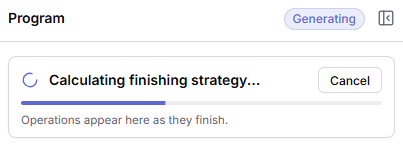
What each message means
| Message | What CAM Assist is doing |
|---|---|
| Starting new request... | Sending the request. The bar moves back and forth until the first status arrives. |
| Extracting PMI... | Reading product manufacturing information (annotations such as hole callouts) from the part. |
| Converting model... | Converting the part model. |
| Converting tools... | Converting the tools from your tool libraries. |
| Analyzing model... | Analyzing the part's faces and features. |
| Calculating facing strategy... | Planning facing. |
| Calculating holemaking strategy... | Planning drilling, tapping and other hole operations. |
| Calculating finishing strategy... | Planning finishing. |
| Calculating deburring strategy... | Planning deburring. |
| Calculating roughing strategy... | Planning roughing. |
| Calculating probing strategy... | Planning probing. |
| Generating operations... | Building the operations. |
| All operations generated. | Done. The card disappears. |
Other messages can appear between these. They come directly from the calculation and end in "...".
On a new run, operations appear in Program as they finish ("Operations appear here as they finish."). You can look at them, but editing waits until the whole program is ready: until then, edit actions show the tooltip Waiting for full program. When you recalculate an edited strategy, the operations are replaced at the end instead.
Stop a run
Click Cancel on the progress card. See Cancel a calculation.