

In the Tools stage, CAM Assist can suggest tools that would suit your part, from CloudNC's tool library or from up to three of your own libraries. You add the ones you want to the part.
Before you start
Choose your machine, material and configuration in the Assessment stage, and check your setups. CAM Assist starts looking once the assessment has finished and the part is set up.
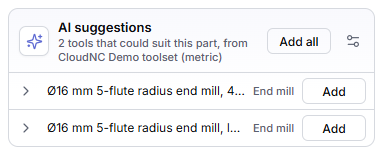
Get suggestions
- Click Tools in the top bar. AI suggestions is below your tool libraries.
- Wait while CAM Assist looks (Finding tools that suit this part). This takes a few minutes. Click Cancel to stop; nothing in Tools changes.
- Expand a suggestion to see its toolpath types, materials and sizes.
- Click Add on a tool, or Add all.
Added tools appear under Individual tools in the Tools list, marked from and the library's name. Only the tool is added, not its whole library.
A suggestion marked Once added, not usable here: wouldn't be usable on this part as it stands, and says why. For example, the tool may not allow the part's material.
Choose where suggestions come from
By default, suggestions come from CloudNC's tool library.
- Click the settings icon (Choose where AI suggestions come from) next to AI suggestions.
- In AI suggestion sources, tick up to 3 tool libraries. Libraries already on the part aren't offered.
- Click Save.
Messages you might see
| Message | What to do |
|---|---|
| AI suggestions will start once the assessment finishes. | Wait for the Assessment stage to finish. |
| AI suggestions will appear here once the part is set up. | Finish choosing the machine, material and configuration, and check your setups. |
| The configuration has changed. Click refresh to get updated suggestions. | Click the refresh icon (Refresh AI suggestions). |
| AI suggestions could not be found. Nothing in Tools has changed. | Click Try again. |
| AI suggestions were canceled. Nothing in Tools has changed. | Click Try again when you're ready. |
| Nothing to suggest. Every tool that could suit this part is already in Tools. | Nothing to do. |